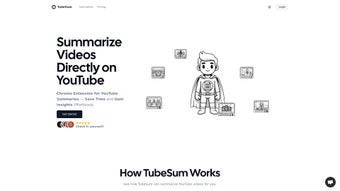

Download TubeSum – AI‑Powered YouTube Video Summarizer, Fast & Secure
Overview
TubeSum is a lightweight Chrome extension that brings the power of artificial intelligence straight to your browser, turning lengthy YouTube videos into bite‑size summaries in seconds. Built for students, researchers, marketers, and anyone who consumes video content daily, TubeSum scans both spoken dialogue and visual cues to extract the core ideas, main arguments, and key take‑aways. The result is a concise paragraph—or a set of bullet points—that tells you exactly what the video covers without the need to watch every minute.
Time is the most valuable commodity on the internet, and TubeSum addresses the pain point of endless scrolling and watching. By offering a quick preview, the extension helps users decide whether a video deserves a full watch, saving hours each week. Because it runs entirely within Google Chrome, there’s no need for separate desktop applications, cloud accounts, or additional downloads. The AI model powering TubeSum is hosted securely on the developer’s servers, ensuring that user data—such as browsing history and video URLs—remains private and is never stored beyond the processing session.
Whether you’re preparing a research literature review, curating content for a social‑media calendar, or simply trying to stay updated on industry trends, TubeSum provides a reliable shortcut. The extension supports videos of any length, from a two‑minute explainer to a full‑hour webinar, and works on any YouTube channel, public or private (as long as you have permission to view the video). In short, TubeSum transforms the way you browse video content, turning a time‑intensive habit into an efficient, data‑driven workflow.
Key Features & How It Works
- AI‑Generated Summaries: Utilises a proprietary natural‑language processing engine to generate human‑readable summaries in under 10 seconds.
- Dual‑Mode Analysis: Analyzes both audio transcripts and on‑screen visuals, ensuring that important non‑verbal information (charts, slides, demonstrations) is captured.
- One‑Click Access: A single click on the TubeSum icon while a YouTube video is playing instantly displays the summary in a collapsible panel.
- Length‑Agnostic: Works equally well with short clips, medium‑length tutorials, and long‑form webinars.
- Language Support: Currently supports English and Spanish, with additional languages planned for future updates.
- Privacy‑First Design: Video URLs are processed in real time; no transcripts or video data are stored on external servers.
- Custom Summary Length: Choose between “Brief” (1‑2 sentences) or “Detailed” (up to 5 bullet points) depending on your needs.
- Free Core Version: The basic summarizer is completely free, with optional premium features such as batch summarization and export to PDF.
- Seamless Chrome Integration: No separate window or tab is opened; the summary appears as an overlay on the YouTube page.
- Regular Updates: The development team pushes AI model improvements monthly, guaranteeing better accuracy over time.
The workflow behind TubeSum is straightforward yet sophisticated. When you click the extension, it captures the video’s unique ID and sends a secure request to the AI engine. The engine first pulls the auto‑generated YouTube transcript (if available) or runs its own speech‑to‑text conversion. Simultaneously, it scans key visual frames using computer‑vision algorithms to detect slides, diagrams, or on‑screen text. These two data streams are merged, filtered for relevance, and then condensed into a readable format that respects the user‑selected length preference.
Because the summarization happens in the cloud, the extension remains lightweight, consuming less than 2 MB of RAM on a typical Chrome session. The result is a fluid experience that feels native to the browser, with no noticeable lag or performance hit.
Installation, Usage & Compatibility
Step‑by‑Step Installation
Installing TubeSum is as easy as adding any other Chrome extension. Follow these steps:
- Open Google Chrome and navigate to the Chrome Web Store page for TubeSum.
- Click the blue “Add to Chrome” button.
- A dialog will appear asking for permission to read and change your data on youtube.com. Click “Add extension”.
- Chrome will download and automatically enable the extension; you’ll see the TubeSum icon (a stylized “T” inside a speech bubble) appear to the right of the address bar.
- Pin the icon for quick access by clicking the puzzle‑piece icon and selecting “Pin” next to TubeSum.
The whole process takes less than a minute and does not require any administrator rights on most systems. After installation, you may want to refresh any open YouTube tabs so the extension can initialize properly.
Generating a Summary
Using TubeSum is intentionally simple:
- Play any YouTube video you wish to summarize.
- Click the TubeSum icon in the Chrome toolbar.
- Select your preferred summary length—“Brief” or “Detailed”.
- The extension will display a small overlay beneath the video player with the AI‑generated summary.
- If you need a deeper dive, click “Expand” to view bullet‑point details or copy the text to your clipboard.
For power users, the settings menu (accessed via right‑click on the icon) allows you to set a default summary style, enable automatic summarization for every video you open, or toggle the premium batch‑summarize feature.
System Requirements & Operating System Compatibility
TubeSum runs on any device that supports the Google Chrome browser, including Windows 10/11, macOS Catalina and later, Linux distributions (Ubuntu, Fedora, etc.), and Chrome OS. Because the extension relies on Chrome’s extension APIs, it is not compatible with other browsers such as Firefox, Safari, or Edge (unless they are running the Chromium engine and allow Chrome extensions).
The extension requires a minimum of 150 MB of free disk space for temporary caching and a stable internet connection (at least 1 Mbps) to communicate with the AI summarization service. Mobile Chrome on Android also supports TubeSum, but the overlay UI is optimized for desktop screen sizes; on mobile devices the summary appears as a slide‑up panel.
Pros, Cons & Frequently Asked Questions
Pros
- Time‑Saving: Reduces video consumption time by up to 80 % for most content.
- Accurate Summaries: Dual‑mode AI analysis captures both spoken and visual information.
- Free Core Version: No hidden fees for basic summarization.
- Privacy‑Centric: No permanent storage of video data or transcripts.
- Lightweight: Minimal impact on browser performance.
Cons
- Only available for Google Chrome; no native Firefox or Safari versions.
- Premium features (batch summarization, PDF export) require a subscription.
- Currently limited to English and Spanish; other languages are in development.
- Reliant on an internet connection; offline summarization is not possible.
- Summaries for videos without auto‑generated transcripts may be slightly less detailed.
Frequently Asked Questions
Is TubeSum really free?
Yes, the core summarization feature is completely free. You can generate unlimited brief or detailed summaries without any cost. Premium add‑ons such as batch processing or PDF export are optional and require a subscription.
How does TubeSum protect my privacy?
When you request a summary, TubeSum sends only the video’s public URL to a secure server. The server processes the video in real time, creates a summary, and immediately discards all transcript data. No logs are kept that could link the summary back to your Chrome profile.
Can I use TubeSum on mobile devices?
The extension works on Chrome for Android, but the user interface is optimized for desktop. On a phone or tablet, the summary appears as a slide‑up panel that may require a larger tap target for comfortable use.
What video lengths can TubeSum handle?
TubeSum is designed to handle any YouTube video, from a 30‑second clip to a 2‑hour webinar. The processing time scales with video length, but even the longest videos typically receive a summary within 15‑20 seconds.
Do I need to log in to use TubeSum?
No. TubeSum works directly from your Chrome browser without requiring a separate account. The only time you might be prompted to sign in is if you choose to enable premium features, which are managed through a secure checkout process.
Conclusion & Call to Action
TubeSum stands out as a smart, privacy‑first solution for anyone who spends a significant portion of their day watching YouTube. By turning hours of video into concise, AI‑generated summaries, it empowers users to stay informed, make faster decisions, and allocate their time to higher‑value tasks. The extension’s seamless Chrome integration, free core offering, and commitment to data security make it an essential addition to the modern productivity toolkit.
If you’re ready to cut through the noise and get straight to the insights that matter, click the button below to add TubeSum to your Chrome browser. Experience the speed of AI summarization for yourself, and see how much more you can achieve when every video comes with a ready‑made executive summary.



.png)



